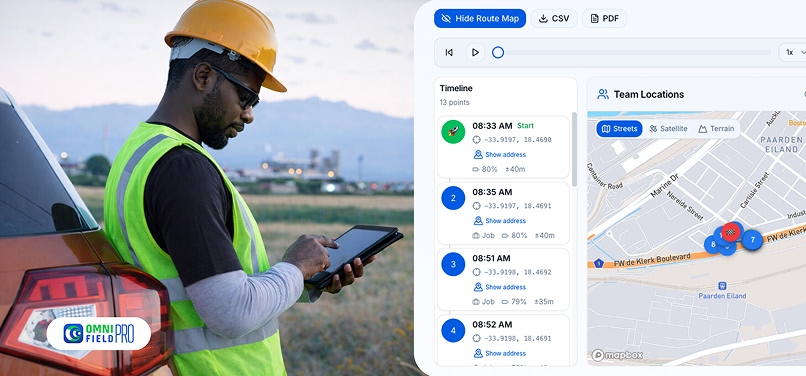
If you run a field service business in South Africa with more than two technicians, there's a good chance you've already felt it, the gnawing uncertainty of not knowing where your team actually is at any given moment. Did they go directly to the job? Did they clock in on time? Did that call-out really take three hours?
These aren't hypothetical concerns. In a 2024 survey of South African service business owners, 64% said they suspected at least some time or materials were being misreported by field staff. The problem isn't necessarily dishonesty, it's the absence of a system that makes accurate reporting effortless and automatic.
This guide covers how GPS tracking, geofenced check-ins, and digital job documentation solve the technician accountability problem without creating a culture of surveillance or mistrust.
How GPS Geofencing Works for Field Teams
GPS geofencing draws a virtual boundary around each job site, typically a 50-200 metre radius depending on the property size. When a technician's mobile device crosses that boundary, the system automatically records the arrival time, GPS coordinates, and a timestamp. When they leave, it records departure. No manual check-in required.
This does two things simultaneously: it makes accurate time-logging effortless for honest technicians (they simply show up and do the work), and it removes the ability for dishonest reporting entirely. The data is objective, GPS-verified, and stored in the cloud.
For your business, this means:
- Accurate payroll calculation based on verified on-site hours
- Billing backed by GPS timestamps your clients cannot dispute
- Route data showing exactly how technicians moved between jobs
- Fuel usage analysis against actual routes driven

Setting Up Geofenced Check-Ins: Step-by-Step for SA Managers
- Assign job sites with GPS coordinates, when creating a job in Omni, the client's address is automatically geocoded. The geofence is set automatically.
- Ensure technicians have Omni mobile installed, the app requests location permissions on first login. This is disclosed to technicians upfront as part of their digital onboarding.
- Review the live map daily, the Omni dispatch board shows every technician's current location, current job, and ETA to the next assignment.
- Set alerts for late arrivals, configure automatic alerts if a technician hasn't checked in within 15 minutes of their scheduled arrival time.
- Review route reports weekly, the route analytics dashboard shows total kilometres driven per technician per week, flagging anomalies for review.
Proof of Work: How Photo Documentation and Timestamps Eliminate Disputes
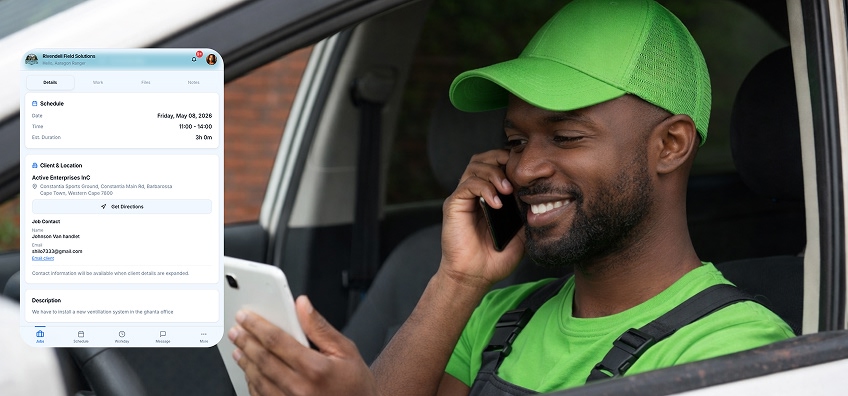
GPS check-in solves the when and where. Digital job cards solve the what. Every job in Omni requires the technician to complete a set of configurable fields before marking the job done:
- Before-and-after photos (required fields, cannot be skipped)
- Materials used (drawn from the inventory catalogue)
- Work description (voice-to-text or typed)
- Customer signature (captured on the technician's device screen)
The result is a complete proof-of-work record that's GPS-stamped, photo-documented, and customer-signed, created at the moment of service, not reconstructed afterward from memory.
Fuel Cost Reduction Through Route Tracking
Beyond accountability, GPS route data has a direct financial benefit: route optimisation. Businesses using route analytics in Omni report an average 22% reduction in fuel costs within the first 90 days, not from dramatic changes, but from small inefficiencies surfaced by data.
Common findings:
- Technicians driving past the next job site to return to the depot first
- Jobs scheduled geographically out of order, creating unnecessary backtracking
- Peak-hour routing that adds 45 minutes to a 20-minute drive daily
Route optimisation suggestions in Omni reorder the day's jobs by geography automatically, shaving fuel and time from every technician's day.
POPIA Compliance for GPS Tracking in South Africa
The Protection of Personal Information Act (POPIA) requires that employees are informed when their location is being tracked and for what purpose. Best practice for SA service businesses:
- Include GPS tracking disclosure in employment contracts
- Provide a written policy explaining what data is collected, how it's stored, and who can access it
- Limit tracking to working hours only (Omni tracking can be configured to activate only during scheduled shifts)
- Ensure data is stored securely, Omni uses encrypted Supabase cloud storage with access restricted by role
Start Tracking with Confidence
Implementing GPS tracking doesn't mean you distrust your team, it means you're building a business that runs on facts, not assumptions. The best technicians welcome it because it protects them too: a GPS timestamp proves they were at the right place at the right time, resolving any client dispute instantly.
Omni Field includes GPS tracking, geofencing, real-time dispatch, and digital job cards in every plan. Start your 14-day free trial, no credit card required.