
For field service business owners managing multiple technicians, the daily scheduling process is one of the most time-consuming, and error-prone, tasks in the business. WhatsApp groups, shared spreadsheets, and verbal confirmations are the norm. Double-bookings are the inevitable result.
A double-booking doesn't just mean an awkward phone call to a client. It means a lost job fee, a damaged client relationship, a frustrated technician sitting idle while another is overbooked, and, in competitive markets like plumbing, electrical, and HVAC, a negative review that discourages the next five potential clients from calling you.
The average South African service business experiences 3-5 scheduling errors per week when operating without purpose-built dispatch software. At an average job value of R850, that's R2,550-R4,250 in weekly revenue at risk, not from bad service, but from bad scheduling.
How Conflict-Aware Scheduling Works
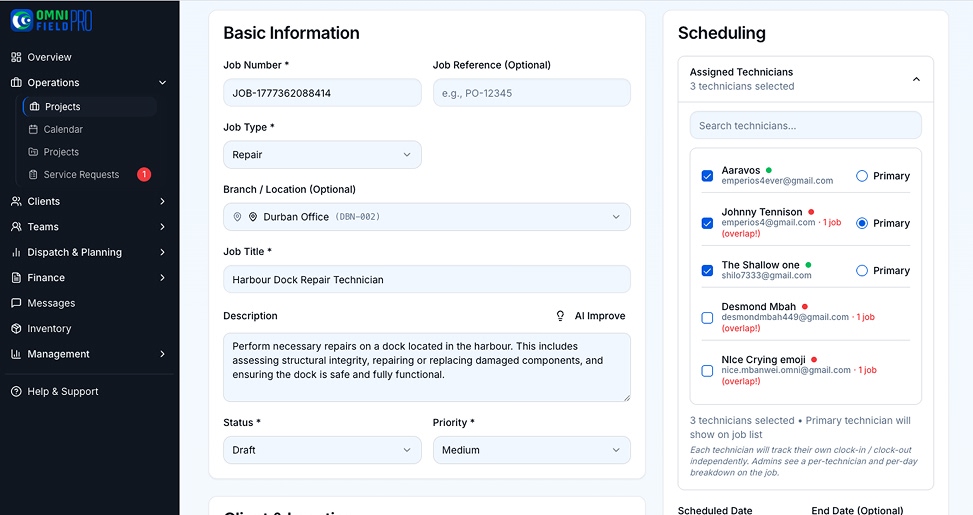
Purpose-built field service dispatch software like Omni maintains a real-time availability model for every technician. When you assign a new job, the system checks:
- Is the technician already booked during the requested time slot?
- Is the technician's travel time from their previous job sufficient to arrive on time?
- Does the technician have the required skills and certifications for this job type?
- Is the technician's vehicle stocked with the necessary parts?
If any of these checks fail, the system flags the conflict immediately, before you save the booking, not after the client has been confirmed. You're presented with alternative options: available technicians in the area, later time slots, or the ability to split the job across two technicians.
Auto-Assigning Jobs to the Right Technician
Manual dispatch requires the dispatcher to know, at any moment, where every technician is, what skills they have, and when they'll finish their current job. This is a cognitively demanding task that scales poorly beyond 4-5 technicians.
Omni's AI-assisted dispatch removes the cognitive load:
- Skill-based assignment: Jobs tagged with required skills (e.g., 'VRF refrigerant certification', 'high-voltage', 'pesticide applicator licence') are automatically matched to technicians with the correct certification, and blocked from technicians whose certifications have expired.
- Location-based assignment: New jobs are prioritised to the nearest available technician, reducing travel time and fuel cost.
- Workload balancing: Jobs are distributed across the team based on current workload, preventing one technician from being overloaded while others are idle.
Managing Emergency Callouts vs. Planned Maintenance
One of the hardest scheduling challenges for SA field service managers is inserting emergency callouts into an already full day without breaking planned maintenance commitments.
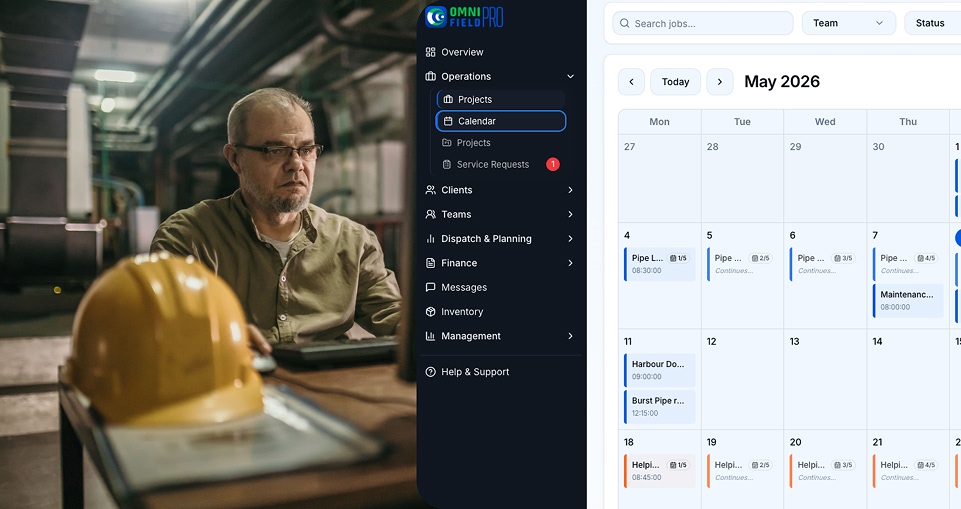
Omni's calendar distinguishes between job types: scheduled maintenance (fixed time, recurring), planned repairs (booked in advance), and emergency callouts (immediate response required). Emergency callouts are displayed differently on the dispatch board and trigger an automatic review of the affected technician's remaining day, flagging any planned jobs that may need to be reassigned or rescheduled.
Recurring Job Scheduling: Never Miss a Maintenance Contract
Maintenance contracts, the recurring monthly or quarterly service agreements that provide stable revenue, are the most valuable jobs in a field service business. They're also the most vulnerable to scheduling failures.
In Omni, recurring jobs are configured once:
- Define the service frequency (weekly, monthly, quarterly, bi-annual, annual)
- Set the preferred day and time slot
- Assign the primary technician (and a backup if unavailable)
- Configure advance notice (jobs appear in the scheduler 14 days before the due date)
The system creates each occurrence automatically and alerts the dispatcher if the assigned technician is unavailable on the scheduled date, triggering reassignment before the client is ever impacted.
How to Manage 10+ Technicians with One Dispatcher
The maximum effective team size for manual dispatch is approximately 4-5 technicians. Beyond that, the cognitive load on a single dispatcher becomes unmanageable and errors multiply.
With Omni, a single dispatcher can manage 15-20 technicians effectively because the software handles the information overhead: real-time location tracking, conflict detection, skill matching, travel time calculation, and workload balancing happen automatically. The dispatcher's role shifts from information manager to exception handler, they intervene when something unusual happens, and let the system manage the routine.
South African businesses that have made this transition report that their dispatcher can handle 40-60% more jobs per day after implementing purpose-built dispatch software, without additional headcount.
See the Scheduling Calendar Live
Omni's drag-and-drop scheduling calendar, conflict detection, AI-assisted dispatch, and recurring job automation are included in every plan. Try it free for 14 days, set up your first schedule in under an hour.